When Downloading From Amazon Music Where Is The File
"So Amazon Music allows Prime members to download complimentary Prime number Music for offline listening. Anyone know where on the device they shop this music?"
Yes, Amazon has early enabled to download songs from Amazon Music awarding. Playing Amazon songs in an offline way is pretty easy today, you lot'll just go to "My Music > Offline Music" to browse the streaming music downloads on mobile. Yet, some would withal need to directly transfer these downloaded Amazon playlists to another device, for which they need to find out the storage location of Amazon Music. Nicely, here this folio volition show you how to locate Amazon Music downloaded files.

- How to Find Amazon Music Download Folder
- How to Download Amazon Music as Local MP3s
How to Find Amazon Music Download Binder
The following nosotros will bear witness yous the detailed steps to find out the download folder of your streaming Amazon Music on PC or Android devices.
Tips: For purchased Amazon Music, you can direct download the audios from a web browser and the files will be typically saved to your browser's default "Downloads" folder.
1. For PC Users
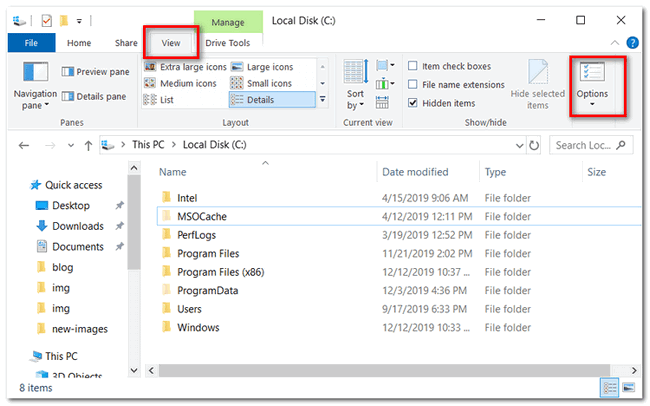
Step 1 Open the File Explorer on calculator, and and so go to "View > Option" to make the hidden folder shown.
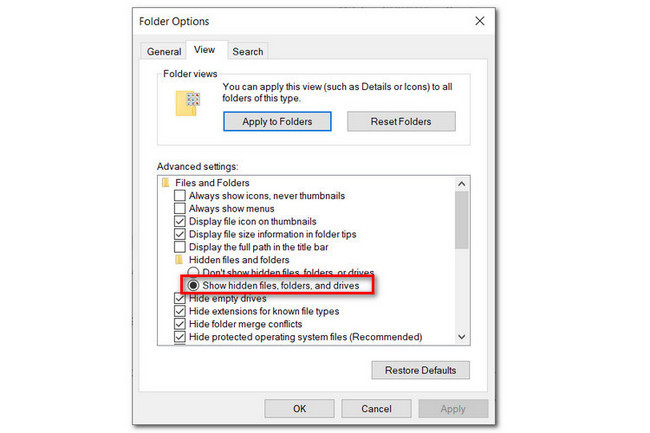
Step two In the pop-upwards Folder Options window, select the "View" tab, and tick the option of "Prove hidden files, folders, and drives", so OK.
Footstep 3 One time y'all change the default settings, yous tin access the downloaded Amazon Music files by going to "C:\Users\UserName\AppData\Local\Amazon Music\Data". Hither "C" is the local deejay where y'all installed Amazon Music app, and "UserName" is your PC account username.
two. For Android Users
Step 1 Open the File Manager on your Android mobile or tablet devices.
Step 2 Now, you can find out the Amazon Music download location by navigating to "storage/emulated/0/android/data/com.amazon.mp3/files/music"; If there'southward an SD card, and then become to "mnt/extSdCard/Android/data/com.amazon.mp3/files/Music".
At present, you have got the download location of Amazon Music on PC and Android. But unfortunately, none of these files tin be played outside Amazon Music client. Actually, your "downloaded" Amazon songs are made in unknown data, encrypted encoded files. Thus, even if you've found out where'due south Amazon Music stored, y'all still cannot re-create and move them to other devices or media players easily.
How to Download Amazon Music equally Local MP3s
But not impossible. There're still some shorcuts we will have -- catechumen and download Amazon Music equally local MP3 audios so that we could share or move them without limitations.
To extract MP3s from Amazon Music, you are required a professional tool, TuneBoto Amazon Music Converter. It'southward a powerful yet piece of cake-to-utilize plan, capable of downloading whatsoever songs from Amazon Music Unlimited and Prime Music in plain music format, with ID3 tags and 100% original audio quality retained.
Amazon Music Converter
-
Catechumen Amazon Music songs & podcasts to MP3, AAC, WAV, FLAC, AIFF, ALAC
-
Works on Amazon Music Unlimited & Prime Music -
Keep ID3 tags; No quality loss -
No need to install the Amazon Music app or other apps -
Free upgrade and technical back up
Detailed Steps to Download Amazon Music to MP3:
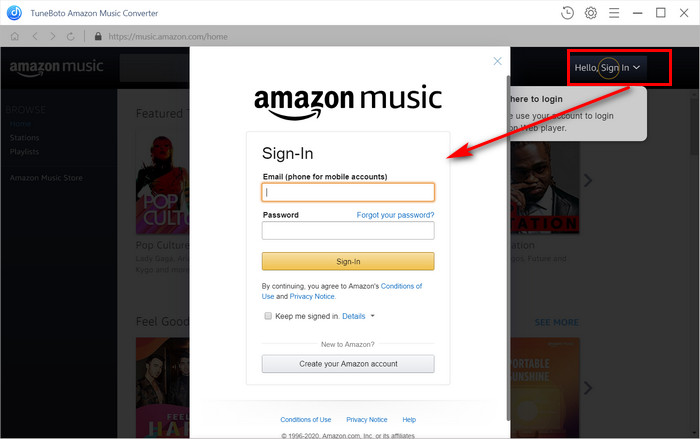
Pace 1 Run TuneBoto and Log into Amazon Music Business relationship
Firstly, install and open Amazon Music, then log into your Prime Music or Music Unlimited account on TuneBoto.
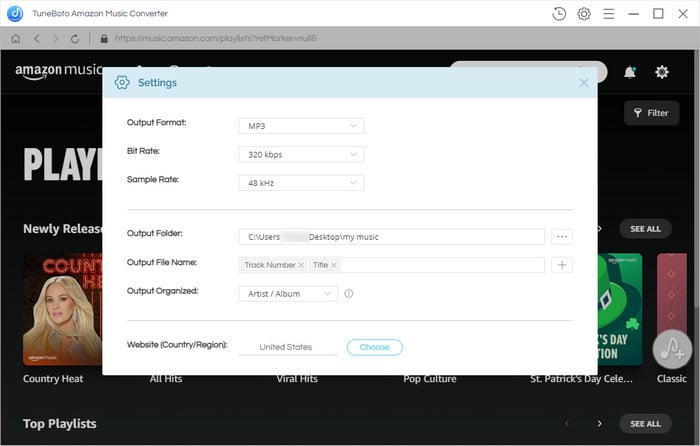
Footstep 2 Select MP3 Output Format
Tap on the gear icon on the top-correct corner to open the setting window, where you can customize the Output Format (MP3/AAC/WAV/FLAC/AIFF/ALAC), Path, Quality (320kbps, 256kbps, 192kbps, 128kbps), and more.
Footstep three Add together Amazon Music
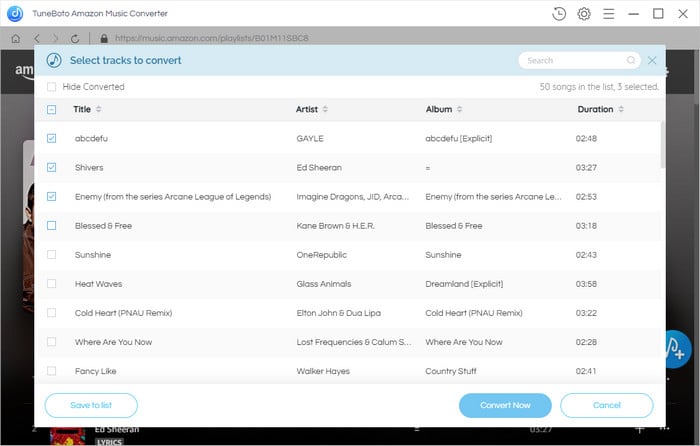
On the main interface of TuneBoto, choose a playlist, album or artist, and tap on the blue "Add" button at the correct side. And then a popular-up window will list all Amazon songs. Cull the Amazon Music you want to convert to MP3.
Pace 4 Start Downloading Amazon Music
Tap the "Convert" button to start downloading Amazon Music. After a few minutes, all chosen Amazon Music will be saved locally in MP3/AAC/WAV/FLAC/AIFF/ALAC format.
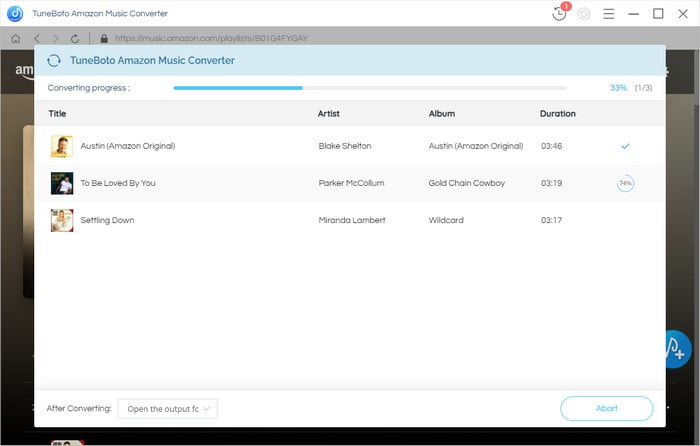
By striking the "History" button or directly going to the output folder you customized previously, you can access all the offline Amazon songs. At present you lot can save Amazon Music on calculator and transfer them to whatsoever device every bit needs.
Final Word
It's a little bit difficult to open the Amazon Music download folder. Merely you volition observe the detailed location past following the guidance above. Besides, since your "downloaded" Amazon songs are only readable with its app, yous tin can use TuneBoto to download Amazon Music as local MP3/AAC/FLAC/WAV/AIFF/ALAC audios. TuneBoto offers the gratis trial version for users to test its features. At present, requite it a shot!

Video Tutorial: How to Convert Amazon Music to MP3?
DOWNLOAD HERE
Posted by: lunnhorthe.blogspot.com


0 Comments